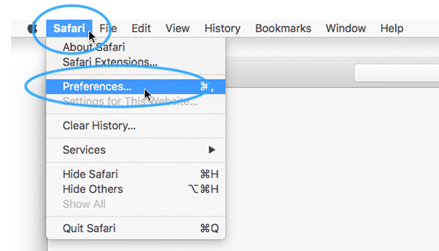
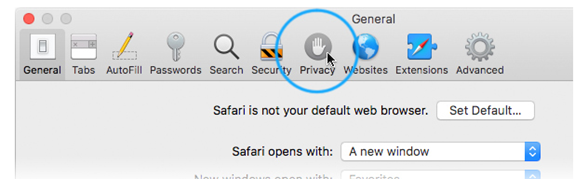
Enabling Cookies in Safari. Florentine July 27, 2022 20:39 Updated Select the Safari menu at the top left of your screen, with Safari open and active. Then click the Preferences item. Click on the Privacy tab. Choose your preferred cookies setting. Related articles Enabling Cookies in your Browser. Turning Off Pop-up Blockers in Your Browser Enabling Cookies in Chrome. Enabling Cookies in Edge. I opted out of my First Day course and am having trouble accessing my Pearson courseware or redeeming my Pearson code. Comments 0 comments Article is closed for comments.


Comments
0 comments
Article is closed for comments.